iT iTimeSheet
EN
Download
Agency consultant Independent consultant Lawyer Electrician Architect Creative freelancer Features Privacy Pricing 🇫🇷 Français 🇪🇸 Español 🇩🇪 Deutsch 🇸🇦 العربية 🇨🇳 中文 🇯🇵 日本語
Since 2008. Rebuilt for 2026.

Time tracking that thinks the way you bill.

Hours, missions, expenses and invoices — entirely on your iPhone. No account. No forced cloud. No cross-app tracking. Your timesheets never leave your device, except for backup to your own iCloud.
iOS 17 minimum EN / FR / ES iCloud backup Anonymous by default
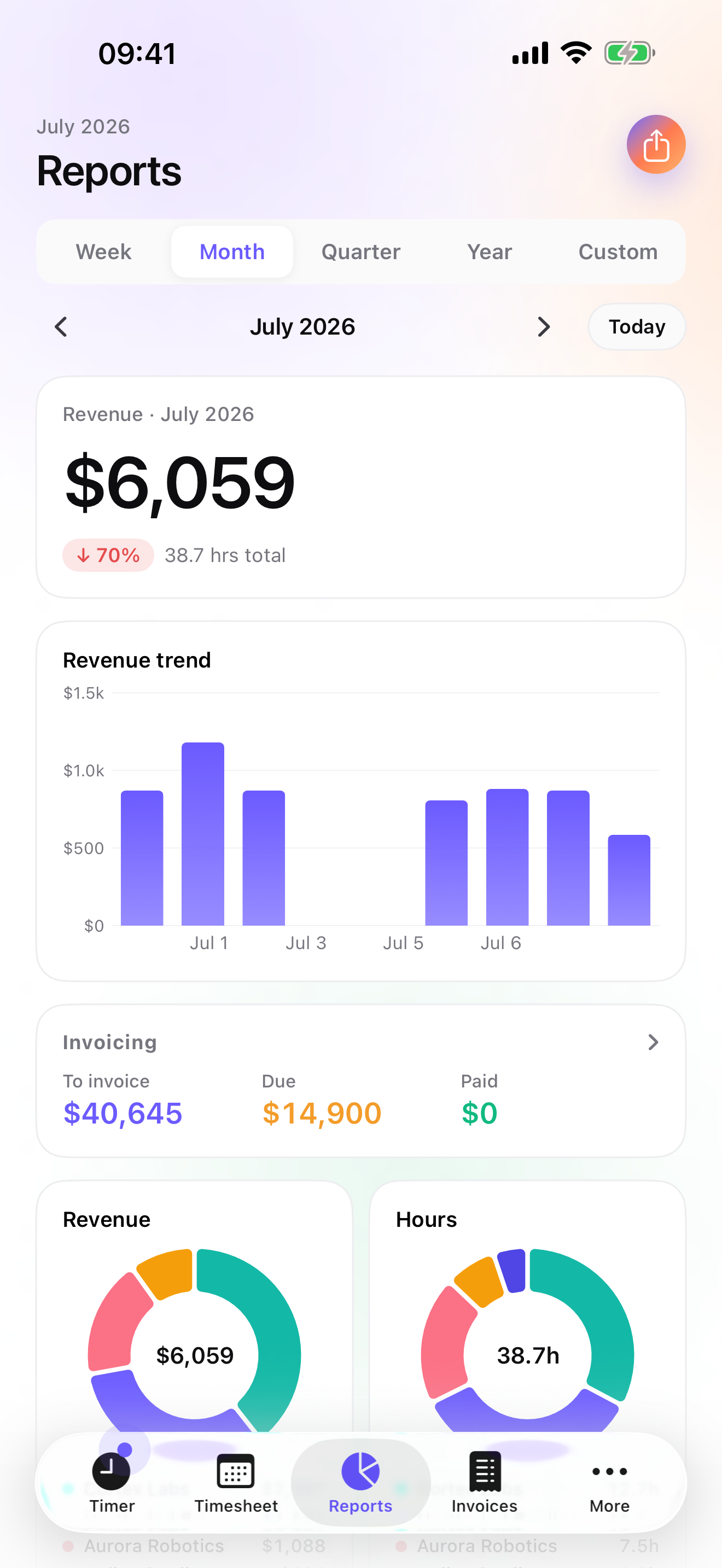
iTimeSheet — Reports screen with revenue, weekly trend and per-client donut
Why iTimeSheet is different

Your hours stay yours.

Most time-tracking apps in 2026 are SaaS that require an account, host your data on their servers, and pay for the app through analytics. iTimeSheet is the opposite.

No account. Ever.

Download the app, it works. No email, no password, no sign-up funnel.

iCloud backup. Yours.

The optional backup uses your iCloud Drive. You see the file in Files. No iTimeSheet server in between.

No ads. No tracking. No ATT prompt.

The app doesn't ping anyone when you start the timer. No advertising, no cross-app tracking, no advertising identifier — so no ATT prompt at launch.

Anonymous by default.

The App Store listing declares data collected by Purchasely, our Paris-based subscription provider — all anonymous, never linked to your identity, never used for tracking. Several notches above competitors.

Features

Built for people who bill by the hour.

Every feature serves the moment you look at your hours and ask yourself: "what do I bill, to whom, and did I capture everything?"

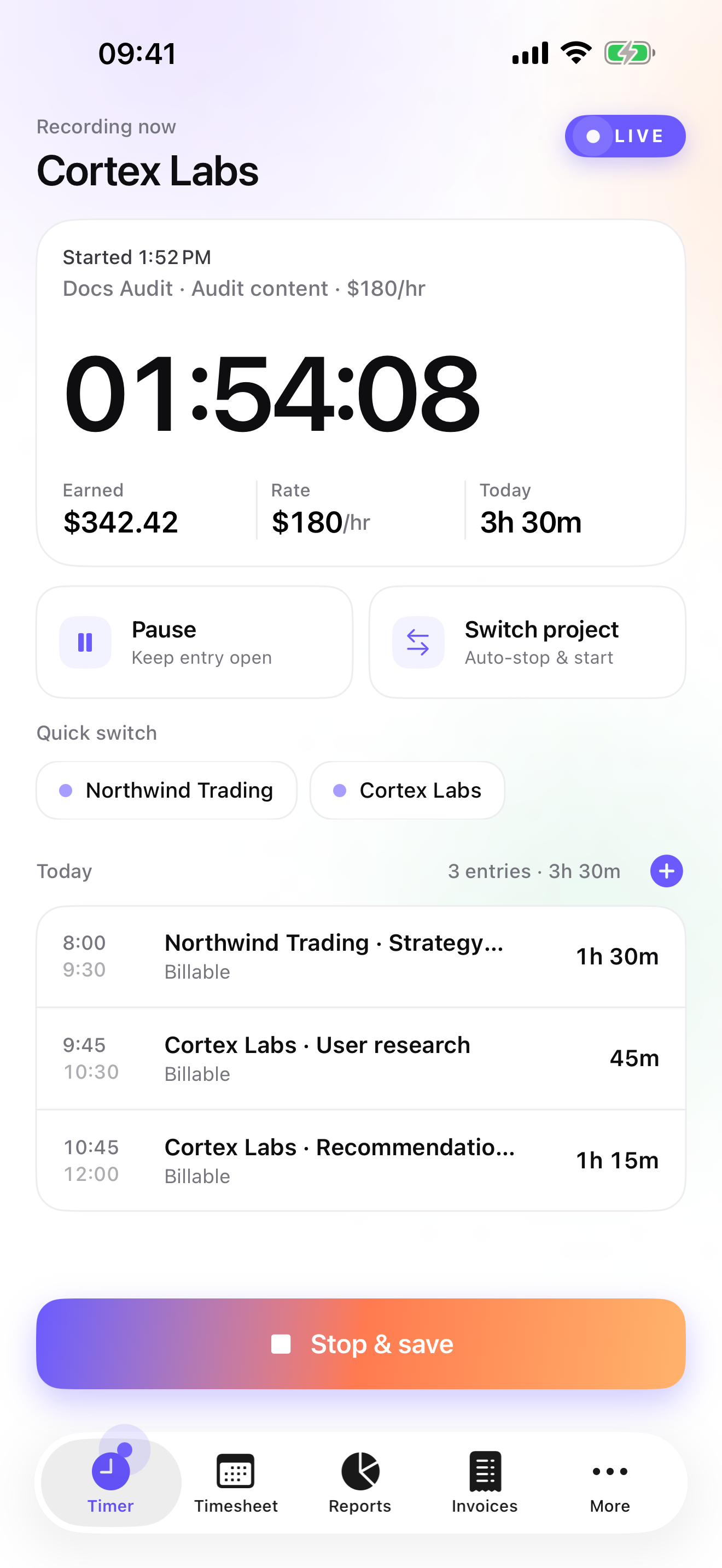
One-tap timer

Start, pause, switch missions mid-task. iTimeSheet saves the current entry and starts the next. You never lose another billable minute.

Scrollable month view

A day grid with daily bars to see at a glance which weeks were full, light or crushing. Tap a day to inspect its entries.

Interactive reports

Pie chart and trend, period-over-period delta, a ten-color palette that keeps each client wearing the same color everywhere. One-tap drill-down to the specific mission.

Expenses with photos

Photo receipt attached to the right mission. Reuse the same expense items across projects. Export expenses alongside hours when you bill.

Export your way

CSV with fully customisable columns, order, formats (date, duration, currency) and separator — European and American locales.

iCloud backup

A local database, in a single file in Files. Restore on a new iPhone in one tap. No middleman, no vendor cloud.

The structure that fits the trade

Client → Mission → Task. With a rate that cascades.

The only iOS app that combines a three-level hierarchy with an hourly rate that propagates. Set $130/hr on a client: every mission, every task, every entry inherits it. Unless you override it at a lower level.

Need simpler? Switch to Client-only or Project-only. iTimeSheet hides the levels you don't use. Contractors track by job site; lawyers by matter; consultants deploy all three.

iTimeSheet — Today screen with live timer
For every trade

iTimeSheet adapts to the way you bill.

Six configurations depending on your trade. Tap the one that fits — each page shows how to set up the hierarchy, reports and exports for your case.

Pricing

Free to start. Three tiers to scale with your work.

Essential for timesheets and exports. Pro lets you log every hour without opening the app — Home Screen widgets, Lock Screen, Dynamic Island — plus expenses with photos. Studio adds PDF invoices with your logo. And the Apple Watch app is included on every plan: start, pause, resume and stop the timer without ever reaching for your phone.

Free
$0/ forever

For occasional use.

  • Up to 3 clients
  • Max 2 entries per day
  • Timer + manual entry
  • Week + month views
  • Basic reports (read-only)
  • Manual iCloud backup
  • No export
Download free
Essential
$4.99/ month

Or $29.99/yr (annual saving).

  • Unlimited clients & entries
  • Client → Mission → Task hierarchy
  • 4-level cascading hourly rate
  • Reports drill-down + custom range
  • CSV export (fully customisable) + PDF
  • Expenses (line items + custom categories)
  • One-way push to Apple Calendar + per-weekday reminders
  • Apple Watch companion — start, pause, resume from your wrist
  • Daily automatic backup (your own iCloud)
  • 14-day trial (annual)
Start Essential trial
Studio
$9.99/ month

Or $89.99/yr (annual saving).

  • Everything in Pro, plus:
  • PDF invoices with your logo + company header (name, address, email)
  • Invoices tab: paid / due tracking, automatic numbering, overdue reminders
  • Quotes, deposit invoices & credit notes — one-tap quote-to-invoice conversion
  • Per-country legal mentions + bank details (IBAN/BIC or routing/account) on every invoice

No free trial — discover Studio risk-free via the watermarked Invoice Preview inside the app.

Subscribe to Studio

VAT collected by Apple where applicable. Cancel anytime in Settings → Apple ID → Subscriptions.

I wrote the first version of iTimeSheet in 2008, on an iPod Touch, because I wanted to track my consulting hours without some company forcing me to create an account. 18 years later, the app has survived ten iOS versions, the collapse of five SaaS competitors, and the steady trust of a few thousand freelancers around the world. v5 is the version I've wanted to write since the very beginning.

— Jeff Grang, building iTimeSheet since 2008.